
Running a small business in Reading, UK? You might be wondering how to stand out on Google and attract more local customers. This friendly guide will walk you through local SEO basics – simple steps to help your Reading-based business appear higher in Google search results. Local SEO (search engine optimisation) is all about making sure people nearby find your shop, office or service when they search online. It’s super important: nearly 46% of Google searches have local intent (people looking for services “near me” or in a specific area), according to backlinko.com. In other words, potential customers in Reading are actively searching for businesses like yours. If you want to attract those local customers, local SEO is essential.
In fact, effective local SEO can directly drive foot traffic and sales. For example, 76% of consumers who search for “near me” on their smartphone visit a business within a day. Whether you’re a café in Caversham, a salon in Tilehurst, or a shop in Reading town centre, showing up prominently on Google means more people through your door. Let’s dive into actionable tips – from optimising your Google Business Profile to getting reviews – that will boost your visibility in the Reading area.
Optimise Your Google Business Profile
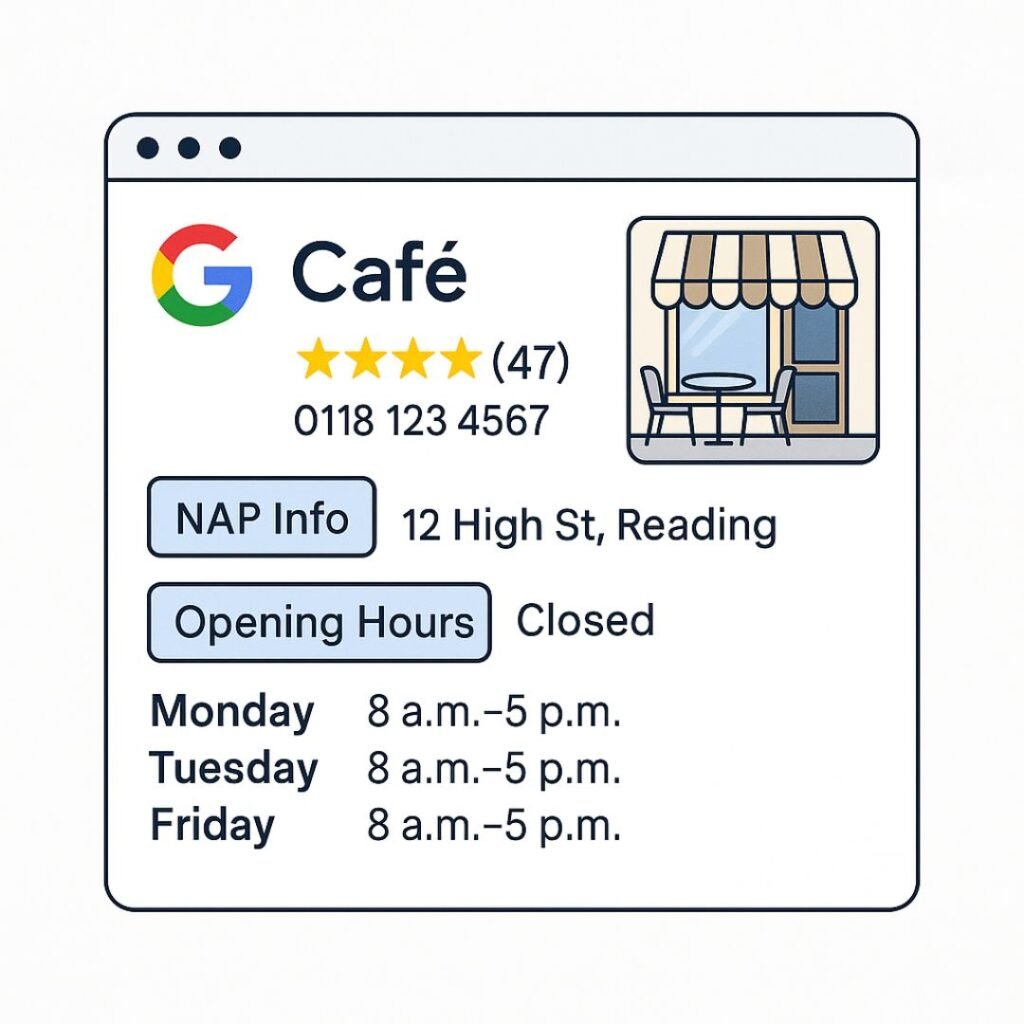
One of the most powerful free tools for local SEO is Google Business Profile (formerly Google My Business). This is the listing that appears for your business on Google Search and Maps – it shows your address, opening hours, photos, and reviews. A fully optimised Google Business Profile makes it easy for local customers to find and trust you. According to Google’s own data, customers are 2.7× more likely to view a business as reputable and 50% more likely to consider purchasing if that business’s Google profile is complete. In short, taking the time to fill out and polish your profile is absolutely worth it.
How to optimise your Google Business Profile:
- Claim and verify your profile: If you haven’t already, claim your business on Google so you can control the info. Google will send a postcard or message to verify you’re the owner.
- Complete every section: Provide up-to-date details for your business name, address, phone (NAP), website, and hours. Double-check that your address matches exactly what you use on your website and other listings. Consistency is key.
- Choose the right categories: Pick a primary category that best describes your business (e.g. “Indian Restaurant”, “Estate Agent”). You can add secondary categories if needed. This helps Google know what searches to show you.
- Write a local description: In the “From the business” section, write a friendly blurb about what you do. Include a mention of Reading and your neighbourhood (e.g. “family-run café in Reading town centre, serving Caversham and beyond”). This can subtly boost your local relevance.
- Add photos and posts: Upload photos of your storefront, products, team, etc. People love seeing images of your business. Try to post updates (offers, events, or new menu items) occasionally through Google Posts. An active profile signals to Google that you’re engaged, which can help you rank higher in local results.
- Collect and respond to reviews: Encourage happy customers to leave a Google review, and respond with a thank-you or helpful reply. We’ll discuss reviews more later, but know that they impact how you appear in the local pack (the map results) and how customers perceive you.
Keeping your Google Business Profile up to date and active is one of the fastest ways to improve your local SEO. It helps you show up in the Google Map pack results and makes a great first impression on searchers. If optimising your profile feels overwhelming, don’t worry – you can always ask for help. (Psst… our team at Xander Strategies can handle Google Business Profile optimisation as part of our SEO services to save you time.)
Target Local Keywords That Reflect Reading Searches
Next up: making sure your website uses the right keywords so that Google (and customers) associate you with Reading. Keywords are the phrases people type into Google. For local businesses, that often means combining your service with location terms. For example, instead of just “plumber” or “hairdresser”, many will search “plumber in Reading” or even get more specific like “plumber Caversham” or “hairdresser Tilehurst”. To boost your rankings, you want to include those local phrases on your website and in your Google profile.
How to find and use local keywords:
- Put yourself in the customer’s shoes: Think about what you would search for if you needed your product or service in Reading. It could be as simple as “[service] in Reading” or “[product] near me”. Jot down a list of variants (e.g. “emergency locksmith Reading”, “best coffee shop in Caversham”).
- Use Google’s suggestions: Start typing a query like “Reading [service]” into Google and see what it autocompletes. Google’s “People also ask” and “Related searches” can also hint at common terms locals use. These are great insights into actual search behaviour.
- Include location terms naturally on your site: Once you know your target keywords, use them in your website’s key areas – page titles, headings, and the content. For instance, your homepage title might be “Joe’s Plumbing – Reliable Plumber in Reading, Berkshire”, and your About page might say “providing plumbing services in Reading, including Tilehurst and Caversham, since 2005.” Incorporating neighbourhood names that you serve can help you capture hyper-local searches. Just don’t overdo it! Write for humans first, and avoid awkwardly repeating “Reading” a hundred times (that could hurt more than help). Experts recommend adding your city in strategic places like titles, descriptions, and headers – but in a natural way without keyword stuffing.
- Create separate pages if needed: Do you serve areas beyond Reading, or different parts of town? Consider making a page for each major area or service. For example, a driving school might have one page for “Driving Lessons in Reading” and another for “Driving Lessons in Woodley”. This lets you target specific local keywords on each page. Industry research shows that having dedicated pages for each service or location and using geographic keywords in your content are among the top local SEO tactics. It helps Google see your relevance to those specific searches.
- Use British English terms: Since we’re targeting UK searchers, use the phrases they use. For example, “estate agents in Reading” rather than “realtors”, or “Reading town centre” rather than “downtown Reading”. This ensures you match the local lingo people search for.
By choosing the right local keywords and weaving them into your site content, you make it much easier for Google to connect the dots that your business = located in Reading = serves a need. Over time, this helps your site rise when someone nearby searches for what you offer. If you’re unsure which keywords to focus on or how to optimise your site content, Xander Strategies’ SEO experts can provide guidance tailored to the Reading market.
Build Local Backlinks and Citations
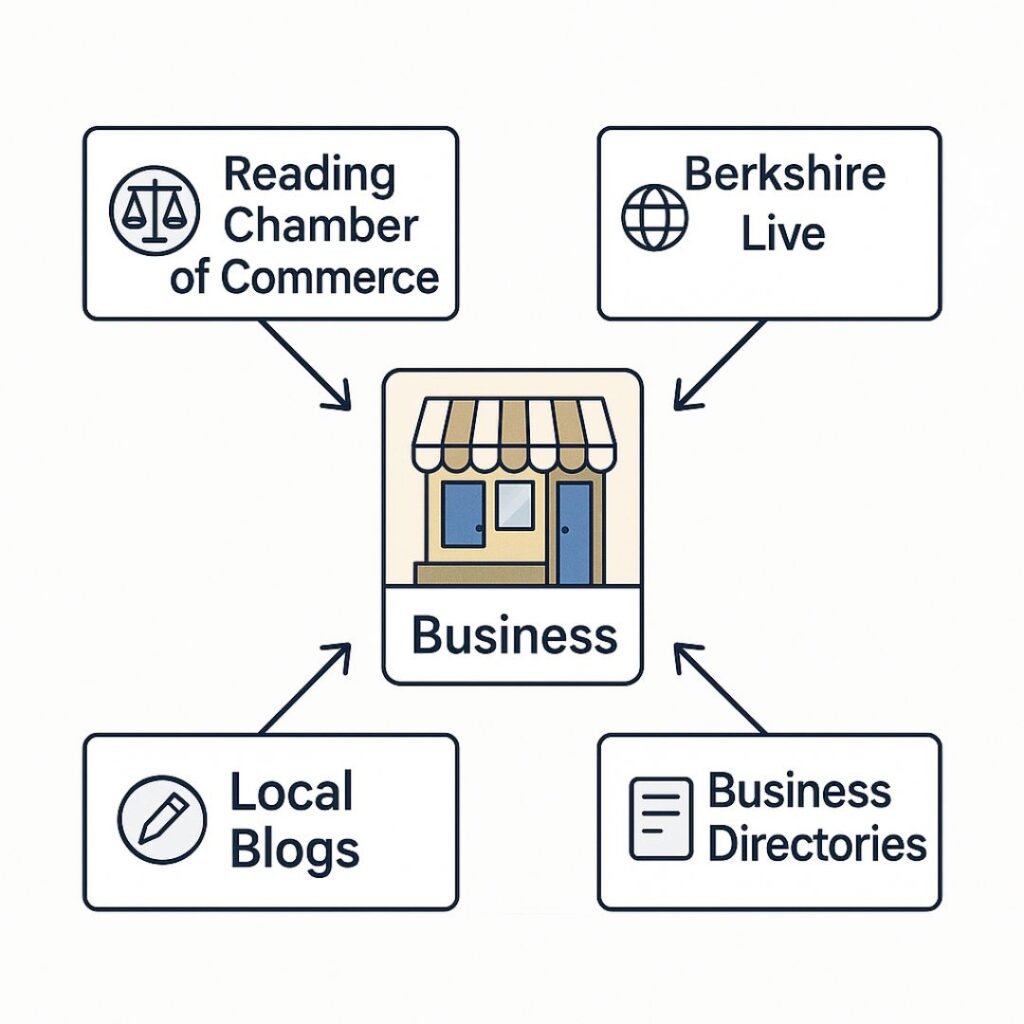
Links from other websites – or backlinks – are like votes of confidence for your business. When reputable sites link to yours, Google sees that as a sign of trust and importance. And if those links come from local sites relevant to Reading or Berkshire, even better! Local backlinks have a big effect on your ranking because they signal that other organisations in the area vouch for you. Essentially, they let Google know “this business is active and important in the Reading community.” The more your business is mentioned on authoritative local websites, the more Google recognises you as a key local player.
Here are some ways to earn quality local backlinks and listings in Reading:
- List on local directories: Submit your business details to popular UK and Berkshire business directories. Websites like Yell, Yelp, TripAdvisor (if relevant), or niche-specific directories can provide a backlink or at least a citation (a mention of your name/address). There are also Reading-specific directories and community listings – for example, the Reading Borough Council website has a local services guide, and “Little Green Book” covers businesses in Reading and surrounding areas. Getting listed in these can improve your online visibility.
- Join the Reading Chamber of Commerce or business groups: Membership organisations often list their members on their sites. If you join the Reading Chamber of Commerce, networking groups, or trade associations in your industry, you will usually get a profile or mention on their website (with a link). This not only aids SEO but also helps real local customers find you through those platforms.
- Sponsor local events or charities: Are there events in Tilehurst or Caversham you can support? Many local schools, charities, or events (like the Reading Half Marathon or a community fair) have sponsor pages online. If you sponsor or even just participate, you might get a link or shout-out on their site. Plus, you’ll build goodwill in the community.
- Pitch to local news and blogs: Local media love stories about neighbourhood businesses. Did you just launch a new service, win an award, or do something noteworthy? Send a friendly press release or email to the Reading Chronicle, Reading Today, or community bloggers. If they write an article about your business, you’ll likely get a valuable link in the article. Even a mention without a link can boost your brand locally, but a link is icing on the cake.
- Partner with complementary businesses: Team up with other local businesses for cross-promotion. For example, if you run a wedding cake bakery, you might partner with a local florist or photographer in Reading. You can recommend each other on your websites (like a “Local Partners” page) – exchanging links that make sense for your visitors. Google values these locally relevant links because they show you’re part of a local network.
- Ensure NAP consistency across citations: Beyond formal backlinks, make sure your business Name, Address, and Phone number appear the same everywhere online. This includes social media profiles, online maps, and any place your business is mentioned. Consistent citations (even without links) on sites like Facebook, Bing Places, or TripAdvisor help reinforce your presence. Google’s algorithm notices that your business info is widespread and consistent, which can improve your local search credibility.
Building backlinks takes a bit of effort, but it can pay off hugely in SEO. Focus on quality over quantity – a handful of links from respected local sites (think Reading council sites, local newspapers, schools or .org community sites) will do more for your rankings than dozens of low-quality links. It’s also an ongoing process, so aim to steadily grow your local links over time. If you need a strategic hand with local link building, our digital marketing services at Xander Strategies can develop a tailored plan to boost your Reading presence.
Improve Your On-Page SEO (Your Website Content)
Now let’s look at your website – because even if you get people clicking through from Google, your site needs to seal the deal! On-page SEO means optimising the elements on your website so that search engines understand your content and local relevance. It also ensures a good user experience for visitors. Here are some on-page tips to help Reading customers find (and love) your site:
- Title Tags with location: The title tag is the main text that appears in Google’s search results for a page (and on the browser tab). Make sure each important page has a clear, descriptive title that includes your service and location. For example, instead of a vague title like “Welcome to Our Site”, use “Plumbing Services in Reading | Joe’s Plumbing”. This way, anyone searching Google sees immediately that you serve Reading.
- Meta descriptions that invite locals: The meta description is the short snippet under the title in search results. While it’s not a direct ranking factor, it influences whether people click. Write a concise, catchy description for each page and mention Reading or surrounding areas. E.g., “Joe’s Plumbing – Trusted plumber in Reading, serving Caversham & Tilehurst. Fast response for leaks, boiler repairs, and more. Call for a free quote!” This tells the searcher you’re local and relevant to their needs.
- Use headings and content to highlight what you do in Reading: On your actual webpage, use headings (H1, H2 tags, etc.) and paragraph text to talk about your services and service area. Your homepage might have a headline like “Reliable Plumbing Services in Reading, Berkshire” — this immediately signals local relevance. Throughout your site’s content, naturally mention the areas you cover (Reading and specific locales like Earley, Pangbourne, or wherever you operate). Maybe include a little map or directions to show you’re a part of the community. The key is to sprinkle local terms in a way that feels informative, not forced. Google will pick up on those keywords, and it reinforces your geographic focus.
- Show your contact info prominently: Nothing says “local business” more than a visible address and phone number. Ensure you have a Contact Us page with your full address (including “Reading, Berkshire” + postcode) and phone. Even better, put these details in your site footer so they show on every page. This reinforces your location across the site (and is handy for customers). For instance, your footer might say “123 High Street, Reading, RG1 2AB – 0118 123 4567”. Including your city and address site-wide boosts local relevance. It also builds trust – people like to see an address, it proves you’re a real local operation.
- Ensure a mobile-friendly, fast website: Many people around Reading will find your site via their mobile phones (especially if they click from Google Maps or search on the go). So make sure your website loads quickly and looks good on mobile screens. A mobile-friendly design (responsive layout) and fast load times not only keep visitors happy, but Google prefers mobile-optimised sites in rankings. It’s part of on-page SEO to have clean code and good site speed. If your site is slow or not mobile-optimised, it could hurt your ranking and drive potential customers away.
- Add local content (optional): Consider having a blog or articles that relate to your local area. Content like “5 Things to Do in Reading This Weekend (Featuring Our Café)” or a case study of a project you did in Caversham can attract local readers and show your community involvement. It’s not a must for everyone, but fresh, locally-oriented content can be a bonus signal to Google that you’re relevant in the region.
Every improvement you make on your website helps both search engines and users. For example, including your city name in your site’s titles, meta descriptions, and headers sends a strong signal to Google about your local focus – just remember to keep it natural and user-friendly. And when visitors from Reading land on your site, they should immediately see that you understand their locale and needs. If your website’s SEO or design is holding you back, you might consider a revamp – our website design services in Reading specialise in creating fast, user-friendly sites that search engines (and customers) love.
Encourage and Manage Customer Reviews
Imagine you’re choosing between two restaurants in Reading on Google: one has a 4.8-star rating with 50 reviews, and the other has no reviews. You’d probably trust the one with positive feedback, right? Customer reviews are gold for local businesses. Not only do they influence people’s decisions, but they also factor into Google’s local ranking algorithm. 75% of consumers say they always or regularly read online reviews when researching local businesses, so having good reviews can strongly sway potential customers. And Google rewards businesses that have a strong rating and review count; high star ratings and the number of Google reviews are known local ranking factors.
Here are some tips to boost your review profile:
- Ask happy customers for reviews: Don’t be shy – often a gentle ask is all it takes. After a successful job or sale, kindly mention to your customer that a Google review would help spread the word. You can do this in person, via a follow-up email, or even on a little card at the checkout. People who love your service in Tilehurst or Caversham might be glad to support you with a nice comment online.
- Make it super easy: Provide a direct link to your Google Business Profile review page. For example, you can generate a short URL that, when clicked, opens the Google review box for your business. Share this link in emails or text messages to customers, saying “Thank you for your business! We’d appreciate a quick review – [link].” The less hassle, the more likely they’ll do it. If you have a physical location, you could even use a QR code on receipts or signage that points to the review page.
- Respond to every review: Show that you value feedback. For positive reviews, a simple “Thank you, we’re so happy you enjoyed [our product/service]!” goes a long way. For the occasional negative review, respond politely and try to address the issue. For example, if someone had a bad experience at your restaurant, apologise and invite them to contact you to make it right. Your responses are public, so future customers see that you’re attentive and caring. This can turn an iffy situation into a positive impression.
- Highlight reviews on your website or socials: You can quote some 5-star reviews on your site’s homepage (“We’ve helped 100+ happy clients in Reading – here’s what they say!”) or share them on Facebook and Instagram. This not only gives you great content but also encourages more folks to leave reviews (people love recognition). Always ask permission if you use a customer’s full name or photo alongside a testimonial.
- Aim for consistent, recent reviews: A steady flow of new reviews looks better than a bunch all at once and then nothing for a year. It signals that you’re actively serving customers and staying current. Set a goal, like a few new reviews each month. Over time, those will add up. Having recent reviews can also influence Google – the algorithm tends to favour businesses that continue to get positive feedback (it shows you’re still delivering quality service now, not just in the past).
Remember, the quality of reviews matters more than quantity. Ten glowing, detailed reviews will beat fifty one-liners. Encourage customers to mention what they liked (service, atmosphere, pricing, etc.) as this adds keywords and credibility. And don’t panic about the occasional 4-star or even 1-star review – it happens to everyone. What’s important is your overall rating and how you handle feedback. By actively managing your reviews, you’ll build a great reputation and improve your chances of showing up in that coveted Google 3-pack of local results.
Conclusion: Get Your Free Local SEO Audit
By now, you can see that improving your Google rankings in Reading doesn’t require magic – just some consistent effort in the right areas. To recap, focus on: optimising your Google Business Profile, using relevant local keywords on your site, building local links, polishing your on-page SEO, and encouraging customer reviews. These steps work together to boost your visibility for searches in our area. A bit of TLC for your online presence can mean the difference between someone finding your shop on Broad Street or never even knowing you exist!
The good news is you don’t have to do it all alone. If you’re feeling unsure where to start or want an expert eye, we’ve got a special offer to help you out. Xander Strategies is offering a Free Local SEO Audit for Reading businesses. This is a comprehensive check-up of your online presence – we’ll review your website, Google profile, keywords, links, and more, and then give you tailored recommendations on how to improve your rankings. It’s essentially a roadmap for getting your business in front of more local customers, and it won’t cost you a penny.